Billing and Subscription
You manage everything about your plan straight from the dashboard: view your current plan, upgrade or downgrade, buy credits, change your payment method, and cancel or reactivate whenever you want. Check current plans and prices on the pricing page.
The Subscription Page
Open Subscription from the sidebar to view and manage your whole plan in one place.
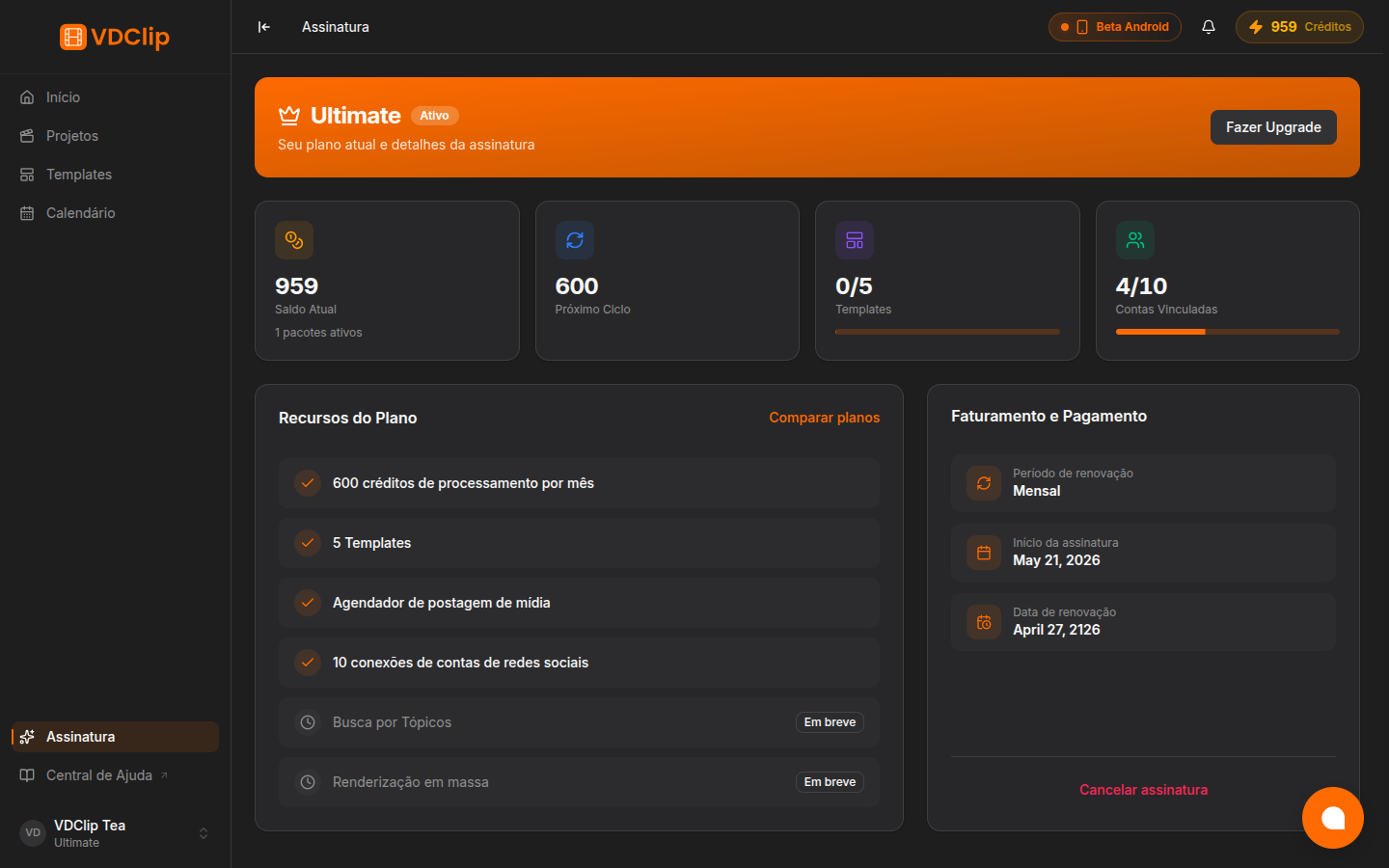
At the top, the highlighted card shows your current plan and the Upgrade button. Below it, four indicators summarize the account:
- Current Balance: the credits available now, with the number of active packages.
- Next Cycle: how many credits arrive at the next renewal.
- Templates: how many templates you use relative to the plan limit.
- Connected Accounts: how many social accounts are connected relative to the limit.
Plan Features lists what is included (credits per month, templates, post scheduler, social connections) and marks the features that are still Coming soon. Use Compare plans to open the pricing page.
Billing and Payment shows the billing period (monthly or yearly), the subscription start date, and the next renewal date, plus the Cancel subscription link.
How Credits Work
Credits are the processing currency in VDClip. They are deducted when you process a video (generating clips, applying AI captions, rendering an export). Uploading or browsing the editor costs nothing.
- Allocated each cycle. At the start of each billing period, your plan’s quota enters your balance.
- They do not roll over. Unused monthly credits are reset at the end of the cycle. Use them before the period ends.
- They can be bought separately. If they run out before renewal, buy an extra package on the Buy Credits page. Purchased credits have their own validity, which you choose at purchase.
Your balance always appears in the top navigation bar, with a full breakdown in Profile > Plan. Check it before starting a large processing batch.
How to Pay with PIX
PIX is an instant, fee-free payment method available only to users in Brazil. Users outside Brazil pay through Paddle (credit card, debit card, or PayPal).
Select PIX at checkout
In the checkout flow for the plan or the credit package, choose PIX as the payment method.
Fill in your details
Enter your full name, CPF (or CNPJ), phone, and address. These fields are required by Brazilian payment rules. When you type the CEP, street, neighborhood, city, and state are filled in automatically.
Generate the QR code
After submitting the details, a PIX QR code appears on screen, with a copy-and-paste key right below.
Pay with your bank app
Open your bank’s app, scan the QR code or paste the PIX key, and complete the transfer.
Wait for automatic confirmation
As soon as the bank processes the transfer, VDClip receives the confirmation on its own, usually within a few minutes. Your credits or plan are activated right after.
How to Upgrade Your Plan
Open the Plans page
Click Plans in the sidebar or “Compare plans” on the Subscription page.
Choose monthly or yearly
Use the toggle at the top to compare the prices. Yearly billing costs less per month than monthly.
Select the plan and complete the payment
Click the upgrade button on the plan you want and finish through Paddle or PIX. The new features become available right after confirmation, with the amount prorated to the remaining days of the current cycle.
Downgrade, Cancellation, and Reactivation
- Downgrade does not happen right away. Your current plan stays active until the end of the cycle, and the lower tier takes effect in the next period, so you do not lose anything you already paid for.
- Cancellation is done on the Subscription page, under Cancel Subscription. You keep paid access until the end of the current period, you are not charged again, and at the end the account moves to the Free plan.
- Reactivation: if the billing period has not ended yet, you can reactivate from the Subscription page and the renewal returns to normal. If it already ended, just subscribe again on the Plans page.
Important: cancellation does not issue a refund for the remaining days of the period. You keep using the service until the end of the paid cycle.